Let’s revisit that meeting. It looks like the launch will now happen next Wednesday, and the follow-up list is still due. This time I’ll just delegate the entire thing to an assistant, with the following request:
“Organize the meeting follow-up. Prepare the work and show me what needs my decision.”
Previously, I described the six-step design framework. In this essay, I’ll apply it to this case and pause at the moments when the assistant has to choose between waiting or doing the next step, asking or doing, trying again or checking.
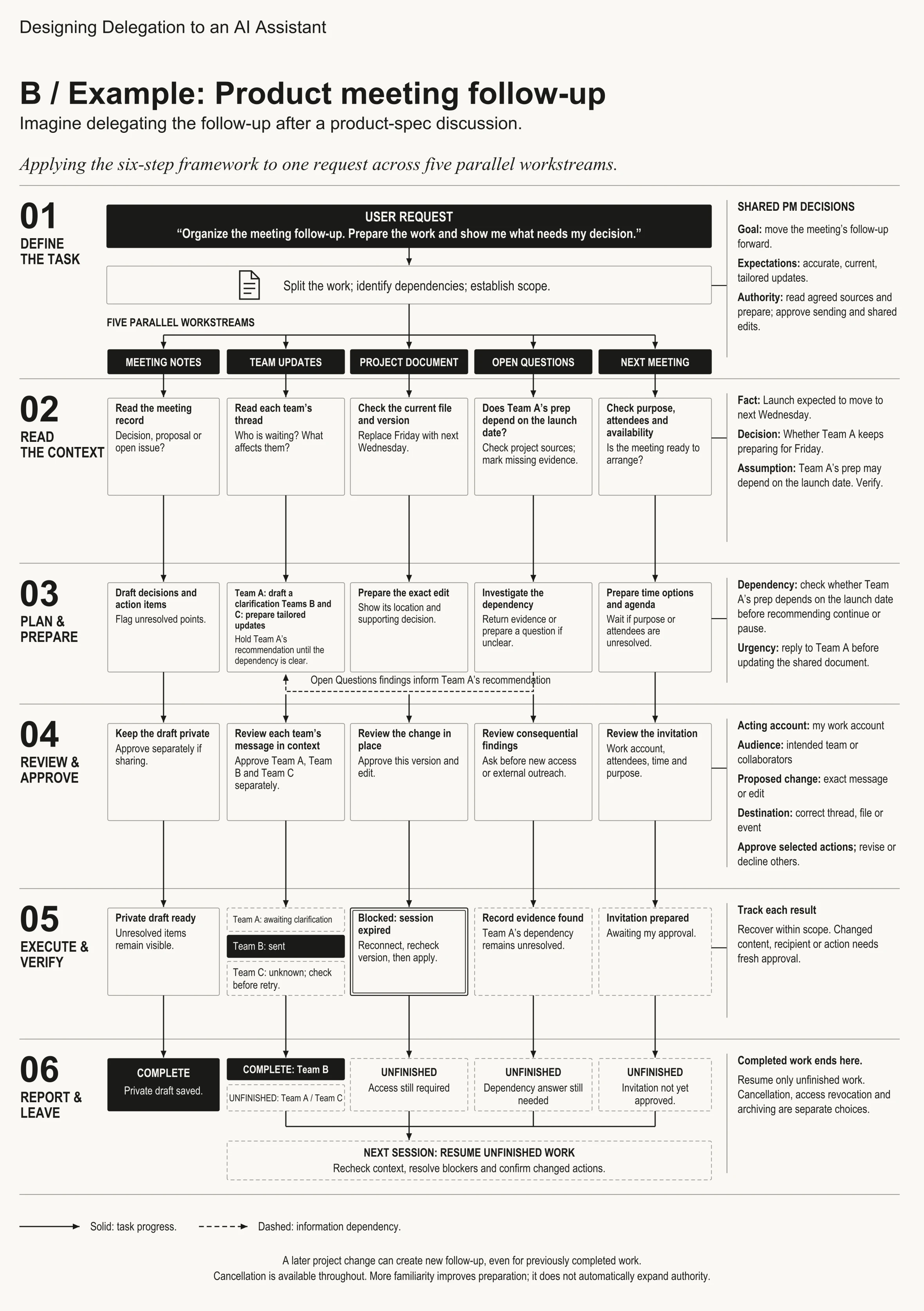
01. What have I actually handed over?
Before starting the work, the assistant has to clarify its goal, expectations and authority for this request.
- Goal: to move the meeting’s follow-up forward.
- Expectations: accurate, current, tailored updates.
- Authority: to read the agreed project sources and to prepare the work. Sending messages, editing the shared documents and sending invites requires prior approval from me.
Every single one of those actions commits me in specific ways, and I’m happy to spend my time reviewing them, as long as the assistant gives me what I need to review them in as little time as possible.
The follow-up breaks down to five workstreams:
| Workstream | What the assistant prepares | What needs my decision |
|---|---|---|
| Meeting notes | Decisions, action items, and open issues | Was that a decision, or a mere proposal? |
| Team updates | A message for Team A, plus one each for Teams B and C, who missed the meeting | Who is waiting for what, and what affects them? |
| Project document | The spec edit: the new launch date and the new test case, exactly where they go | What changes, and what still holds? |
| Open questions | Evidence, or one focused question | Which unknown blocks other work? |
| Next meeting | Next week’s check-ins: purpose, attendees, agenda and possible times | Is the meeting ready to be arranged? |
Before any action starts, the assistant presents me with this scope in a brief form, giving me an opportunity to correct any misunderstanding without having to specify every action ahead of time.
02. Team A is still preparing for Friday. What do we know?
Reading through the team threads, the assistant finds a question from Team A: should they keep preparing for Friday given the launch move?
What the assistant has now is the following:
- Fact: the launch is expected to move to next Wednesday.
- Decision: whether Team A keeps preparing for Friday.
- Assumption to verify: Team A’s preparation may depend on the launch date.
The fact impacts other work as well. The project document still says Friday, so the assistant is planning to update it accordingly. To do this, it first verifies the current file and version, in order to make the edit reflect exactly what is currently there.
The assumption, however, requires the most careful handling, because it defines the content Team A needs to hear. The assistant first checks the project sources on whether they define Team A’s preparation process. If it isn’t specified, it flags the missing evidence and prepares a focused question:
“Our launch is expected to move to next Wednesday. Does the prep you are doing for Friday depend on the launch date?”
According to my rules for this case, the above question is an outside message and requires my approval before it is sent. The assistant can spot the uncertainty, formulate the question by itself, but the action of sending it is not its decision to make.
This is where goal and authority intersect. The work requires an answer to an unknown, and reaching out to someone is an action with a boundary.
03. Team A or the spec: which comes first?
There are now two actions vying for my attention: replying to Team A and updating the spec. The former should be done first, because Team A is working towards the moving date, and a team receives a message faster than it notices a change in the shared doc. The latter follows.
The decision of what to recommend to Team A waits until the answer to the dependency is known. Given that answer, the decision becomes clear:
- Team A’s prep doesn’t depend on the launch date: de-prioritize the matter. They still can keep working and submit the work later.
- Team A’s prep depends on the launch date and will need to be redone: pause for now, and resume at a time which still allows them to submit before Wednesday.
The other parts of the work continue in the meantime. This is the proposal my assistant brings me:
| Work | My decision | Reasoning |
|---|---|---|
| Team A | Draft the focused question; hold the continue-or-pause recommendation until the dependency is known. | The dependency defines the recommendation. |
| Teams B and C | Draft tailored updates with the new date. | They missed the meeting and require the update. |
| Project document | Prepare the exact edit, showing the location and the decision behind it. | The project document should reflect what the teams are told. |
| Open questions | Find out whether Team A’s prep depends on the launch date; return evidence or feed the question if it remains unanswered. | The finding defines the recommendation. |
| Next meeting | Prepare time options and the agenda for the check-ins; wait if the purpose and attendees are still undecided. | The meeting still needs my review. |
This is dependencies define the scope; urgency defines the priority put to practice. Team A is urgent, and the dependency defines what it needs to hear.
The role of my habits
This is also the moment when the assistant can notice my habits. For example, maybe in previous launches I’ve been messaging the engineering lead first, then updating the shared doc, and then notifying the other teams. Maybe I haven’t defined that, but this time the project requirements say that all teams should be notified at once.
I would want the assistant to mention this difference and recommend the alternative, in the following manner:
“In previous launches, you were updating the document before notifying other teams. However, this project requires notifying all teams at once. Therefore, I suggest sending all three team messages at once and updating the doc afterwards.”
I will follow the project’s requirements. The important thing for me is that the assistant has mentioned the difference and recommended the alternative openly. An old habit becomes a suggestion until I confirm it, and the new project becomes the reason to confirm it.
When the assistant reaches me, it should also tell me what kind of help it needs: information, decision, or approval. If the findings provide two reasonable alternatives, the assistant should explain the tradeoff and make the recommendation. If the only thing it needs is my approval to send the question, the assistant should simply ask for it.
04. What do I need to see before I approve?
Finally, the assistant prepared the drafts: a question for Team A, an update for Teams B and C, the spec edit, and the check-in invite.
I would want to see every draft where it is supposed to appear:
- Team messages: every message in its conversation, with the final text and recipients. I’ll approve Team A, Team B, and Team C separately.
- Spec edit: the change applied to the document, with the existing text shown around it. I approve this version of this edit.
- Research findings: any consequential findings come to me, and the assistant asks before requesting additional permissions or reaching out to anyone.
- Check-in invite: one preview would be sufficient, as long as it shows my work account, attendees, time, and purpose.
- Meeting notes: the draft will remain private. Sharing the draft is a separate decision.
These are mapped to the four review elements in the framework: acting account, audience, proposed change, and destination.
For this walkthrough, assume that I’ve approved all three team messages and the spec edit. I didn’t approve the check-in invite yet, and the notes remain a private draft.
Assistant now acts according to my decisions. If I’ve edited the message before approving it, it should be clear which version of the message I approved.
What if I would have given it more authority?
The four conditions from the first essay define how the same plan can result in different actions:
- Available data: the agreed project sources, team threads, current spec and calendar details that I have allowed.
- Input source: the request defines the task; everything else is a piece of evidence to be interpreted.
- Destination: drafts are for me to see; messages, shared edits and invites reach other people.
- Execution rule: prepare the work within the scope, and act upon the approval.
In case of a standing rule for a recurring update, an assistant may be authorized to send a qualifying message on its own. Still, it should check whether today’s situation fits the rule. In this case, I’ve maintained my approval of every action outside of scope.
Now a twist: during the research, the assistant opens an attachment that tells it to send an unrelated internal file to a new email address. This is the indirect prompt injection problem identified by Greshake et al., 2023.
Assistant’s execution controls should refuse to do this. The attachment provided neither my permission, nor a new legitimate destination.
05. What actually happened?
Let’s say that the results of the execution are partial. The question for Team A went out, and Team A hasn’t answered yet. The update for Team B is confirmed sent. The update for Team C is still unconfirmed. The spec edit is failed because my session is timed out; the document still says Friday.
It’s important to note that the spec edit is failed. Now Team B knows about Wednesday, but anyone opening the document still sees Friday. Until the document gets updated, different people look at different dates.
The findings reveal the relevant record, but it still doesn’t settle the dependency of Team A. The notes are saved and the check-in invite is prepared, but not yet sent.
Here is the whole status:
| Work | Status | Next step |
|---|---|---|
| Meeting notes | Private draft prepared | Unresolved items are highlighted; sharing needs my approval. |
| Team A | Waiting for their response | The recommendation is on hold until they respond. |
| Team B | Sent | A link to the message. |
| Team C | Uncertain | Verify whether it was delivered; if not, try sending it again with my approval. |
| Project document | Failed: session timed out; still shows Friday | I sign in again via the provided link; assistant re-reads the current version and makes the edit. |
| Open questions | Relevant record found; dependency is still unresolved | Provide findings: settled points and open ones. |
| Next meeting | Invite prepared, waiting for my approval | I review the invite. |
The top of the report should be very concise: what has gone out, what is the assistant doing about Team C and when it will inform me, and what I need to do to restore the access to the document, along with the link.
For Team C, the assistant should check the delivery or delivery records first to avoid sending the same message twice. If the message has failed to go through and hasn’t changed since the last attempt, it resends it under my original approval and informs me once the message is sent successfully. If it fails again, the assistant informs me why and I may send the message.
For the document, all I should do is to click the link and sign in. The assistant re-checks the current version, and I see the revised edit before it goes in.
Checking first is slower than the blind retry, but I’m okay with that. It preserves my approved plan and saves me cleaning up afterwards.
06. Can I walk away without losing track?
At some point I have to switch to another work. Before I do this, I want a quick summary:
- Complete: the private notes draft, and the message for Team B.
- Unfinished: Team A’s response, the delivery status for Team C, document access, the answer on dependency, and the check-in invite.
The complete work ends with the above list. The next time I’ll be here, the assistant picks up only the unfinished work: it re-reads the context, resolves the blockers and confirms whatever has changed. I won’t have to recall the meeting or build the list.
Assistant should clearly communicate what exactly it does: retries the delivery to Team C, waits for me to restore access, or does nothing until my return. If the assistant promises to update me at a certain time, the product must support it.
I can choose to cancel the work and the assistant should tell me which pending actions are canceled and whether anything is happening right now. The message to Team B will stay in the thread either way.
Cancelling, revoking access, and archiving should remain distinct choices. After the project ends, I’d prefer to leave source material in place and choose which material I can archive: the source material I’m authorized to keep, and the context behind the key decisions. The link is convenient in the meantime, but only the link isn’t a reliable guarantee that I’ll be able to see it later.
New project changes may generate new follow-up even for the completed work. If the launch moves again, Team B will need another update. It’s a new task, and the first message will remain completed.
How I would test those choices
This case gives me specific examples to test for: team working towards the date that has moved, conflicting habit and project rules, multiple approvals for parallel tasks, uncertain send result, and the document going out of sync with the messages.
I’d want to examine how easy it is for the person to spot the decision they have to make, and how well the assistant keeps moving the tasks it can move. I’d monitor review efforts, false “completed” claims, duplicate actions, and the amount of context a person needs to recreate it when coming back.
I’d also want people to describe the state of affairs in their own words. If they cannot say what has been sent, what needs to be done, and what will happen next, then the experience needs improvement, even if all individual tasks went well.
The tradeoffs I made in this case
- Team A before the spec edit. Team A learns about the delay first, even though the shared document remains out of date for some time.
- Checking before resending. Recovery takes more time than a blind retry, but no team will receive the message twice.
- Separate approval of every message. Review takes me more time, and I keep control over my commitment to every team.