Finally, the zoom call is over at 5. It looks like I can’t finish my day until I follow up on this spec-change meeting. But anyway, the frontend team just informed me that the launch is now expected to move from Friday to next Wednesday. Follow-up: two messages for the teams that didn’t attend the meeting, a spec update with the new date and a new test case, next week’s check-ins to schedule, and some research on whether the delay affects another team’s work.
Every single task is not complicated in itself, but altogether they put quite a strain on my mind: who is waiting for what, which answer will trigger which next step, and what am I actually committed to.
But wouldn’t it be awesome if AI, the most promising technology of today, could help me with that? And that idea led me to the topic of personal AI assistants. Then more practical questions came: what would I delegate to the assistant, and what would I do by myself?
I could already picture the disaster: the assistant spends ages reading every single document in the project and still messes it up. I ask it to give me a two-sentence update and get the whole project plan in response. It takes ten tries for it to find the right Brian Wang on my team, and by that time I could have scheduled the check-in myself.
After considering a couple of scenarios, I settled on six steps. That is the framework I would use for the assistant if I were its product manager. Each step builds upon what I would expect as the user.
| Step | What I expect as the user |
|---|---|
| 01 Define the task | Understand what I mean. |
| 02 Read the context | Know what is current. |
| 03 Plan and prepare | Bring me a useful next step. |
| 04 Review and approve | Let me see and control the consequences. |
| 05 Execute and verify | Tell me what actually happened. |
| 06 Report and leave | Let me leave with clarity. |
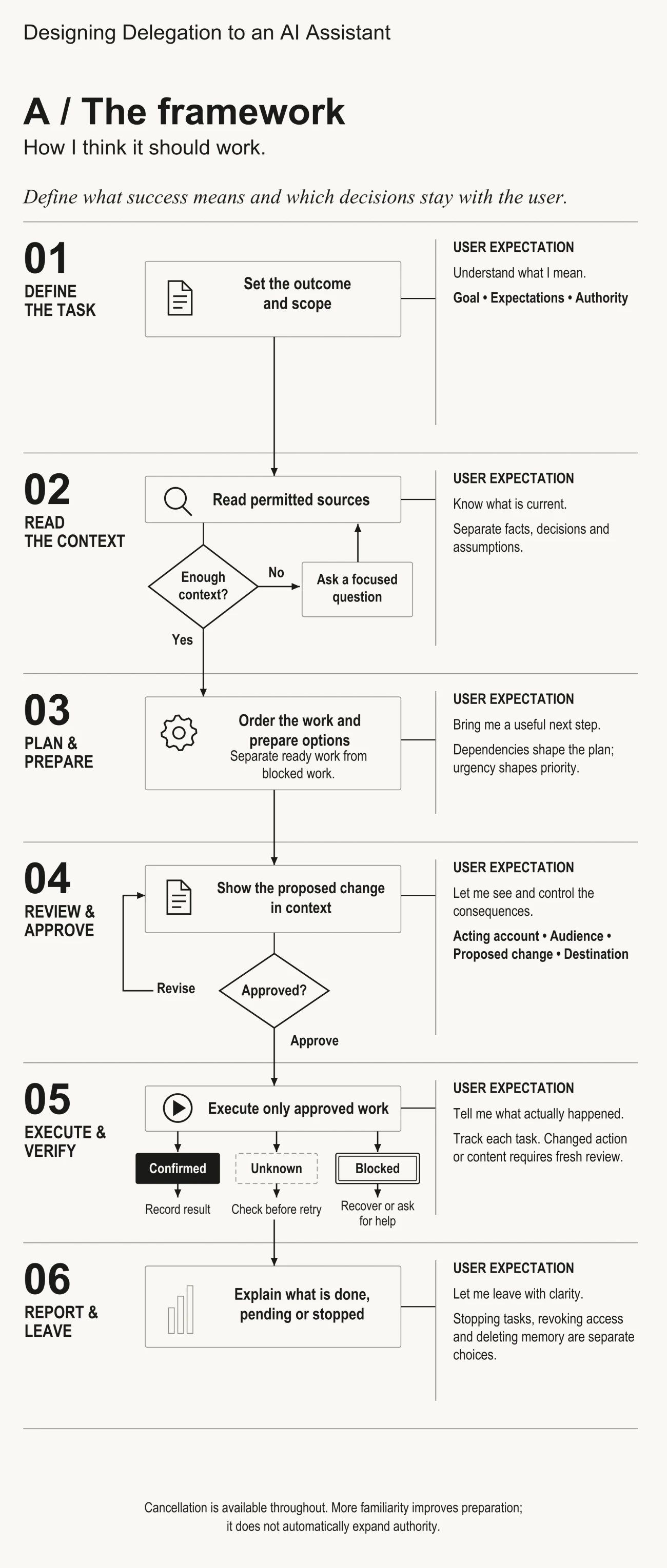
There is a lot of blurring between those steps in practice. Some are iterative, and some tasks may cover a couple of them at once. This framework is designed with work environment in mind, thus using it in other areas of assistance will require additional verification of its premises.
01. Define the task: understand what I mean
“Hold the follow-up” seems very clear until you try to follow it. That gives the assistant the direction. It tells nothing about the desired outcome and possible actions.
Thus, I separate every task into three parts:
- Goal: the result I want. Push the follow-up forward.
- Expectations: the criteria for the result and how to get there. Accurate, current updates, written for each team.
- Authority: the sources it can access and the actions it can perform. Read the agreed sources of the project and prepare the work; check with me before any action and any editing of shared documents.
Each part can fall on its own. The most accurate update can go from the wrong account. The most well-written spec edit can leave another team waiting for an answer. The assistant can perfectly understand what I mean, and still perform the action without my permission.
A good assistant informs me about its scope before the task begins: what it will prepare, what sources it will look through, and what it will leave me to decide. Also, a good assistant reuses the preferences and permissions I have already set up. I don’t want to fill out a questionnaire every time I need help.
The actual design question is which gaps I need to clarify before delegating the task. The unclear recipient can affect the meaning and audience of the message, thus it is important to ask. Formatting preferences can wait until the draft. I can change it then.
02. Read the context: know what is current
Once I have clarified my intentions, the assistant needs to know the current situation. Back to my afternoon: the launch is expected to move to next Wednesday, and Team A is wondering whether they should keep preparing for Friday. No one knows yet whether their work depends on the launch date.
Those pieces of information belong to three categories: facts, decisions, and assumptions.
- Facts: something that happened. The launch is expected to move to next Wednesday.
- Decisions: the calls that were made, or calls that the fact forces someone to make. Whether Team A should keep preparing for Friday.
- Assumptions: something that looks likely, but hasn’t been confirmed yet. Whether Team A’s prep depends on the launch date.
Each one gets a different treatment. The assistant works with the fact, takes the decision to the owner, and checks the assumption before making any recommendations based on it. If the assumption is wrong, the recommendation goes wrong with it.
“Current” is more complex than it sounds. The latest message in the thread doesn’t automatically overwrite the previous plan. Before the assistant considers Wednesday to be the new date, it should know who said it, where it was recorded, whether it is settled or still in the process. When the fact about a project affects the next step, it goes back to the agreed sources and checks again.
When the information is missing, the assistant searches first among the sources it is allowed to use. When it still cannot find the answer and it changes the work, that is when it asks one focused question and explains why it is important.
When a document tries to give orders
Reading has a security problem known as prompt injection: the text that makes the AI system work against the instructions it got. Simon Willison gave some examples of prompt injection in September 2022 (Willison, 2022). In February 2023, Greshake et al. described the concept of indirect prompt injection, where the attack is embedded into the content retrieved by the AI (Greshake et al., 2023).
For my framework, that means one additional rule: the permission to read a document allows me to use it as the evidence, and nothing more. A document of a project can inform the assistant about what was decided. It cannot grant the assistant the permission to share a file with someone new. Simply writing that rule into the prompt will not be enough. The product has to enforce it in the assistant’s actions, which is where the step 04 picks it up again.
03. Plan and prepare: bring me a useful next step
Team A’s question requires me to make a choice: should I answer Team A first, or should I update the spec first? Team A goes first. They work towards the date that moved, and teams get messages faster than they notice a change in a shared document.
What Team A should get depends on whether their work depends on the launch date. The urgency tells the assistant to answer quickly. The dependency tells it what to say. That is the core of this step:
Dependencies shape the plan. Urgency shapes the priority.
If the dependency is not clear yet, the assistant holds the recommendation and prepares one focused question for Team A. Otherwise, it keeps preparing the work whose content is clear. The next essay will walk you through the answer Team A could get.
A useful next step can be a draft, a few options, or one focused question. I judge it by one thing: does it push the work forward?
When the assistant needs me, it should explain what kind of help it needs. “Should I proceed?” can hide three different requests:
| What it needs | What it brings me |
|---|---|
| Missing information | One focused question, and why the answer is needed |
| A decision I make and keep | The options, their consequences, and the recommendation |
| Permission to perform an action | The exact message, edit, or action, in context |
Clarifying the request allows me to respond quickly while the rest of the work keeps moving forward.
04. Review and approve: let me see and control the consequences
Approval means nothing if I do not understand what I am approving. Thus, every review should show me the following:
- Acting identity/account: whose identity or account will be performing this action?
- Audience: who will receive the message or be affected by the edit or action?
- Proposed action: what exact message, edit, or action?
- Destination: where the action will land: the thread, file, or calendar event?
Audience and destination seem similar, but they answer different questions. The same team might have a private chat and a project page that the whole company reads. Changing where the update shows up changes who receives it and how they perceive it.
The best format for review depends on the type of item. The message needs the context, the spec edit needs the change in the place, with the surrounding text. The meeting invite needs one clean preview.
Also, I want to approve item by item: approve one message, revise another, deny a third. The approval should stick to the exact version I have seen. When the recipient, the wording, or the situation in the project changes, I should be asked again.
How much to approve is a personal decision. For my own communication, I prefer to have the final say on everything. Another person might allow the assistant to send a recurring update independently under certain conditions. The review flow has to match the rules of the user.
Why a review screen cannot guarantee safety
Two outside ideas influenced my perception of this step.
Simon Willison introduced the concept of lethal trifecta in June 2025. It is a dangerous combination: the AI agent with access to private data, exposure to untrusted content, and the capability to communicate externally. With all three conditions met, an attacker can trick the agent into sharing that data (Willison, 2025).
The Agents Rule of Two in Meta’s blog, published in October 2025, is partly based on the lethal trifecta concept. According to the agents rule of two, within a session the agent should have no more than two of the following: access to sensitive systems and private data, the ability to change the state or communicate externally, processing of untrusted input. If all three are required for the task, the agent needs to run under certain supervision, for example, human approval or another reliable check. Meta is also honest about the limits: even with the rule in place, the design could fail, when the user approves the warning without reading it (Meta, 2025).
My interpretation of those ideas is to look at the four elements together: available data, input source, destination, and execution rule. What can the assistant access? Where did this instruction come from? Where will the result land? What rule controls whether the action is executed? Those four are my working lens, not a framework derived from either source.
A review screen allows me to stay in control, but it is not enough to guarantee the safety. I would also need the limits on the tools and destinations the assistant uses, and the security testing of the entire design. My approval cannot guarantee I noticed all the hidden leaks and attacks.
05. Execute and verify: tell me what actually happened
Once I approve something, the assistant becomes responsible for finding out the results. For each task, the assistant has to track the approved item, what it has tried to do, and what is confirmed. Everything I have not approved stays prepared and awaits my decision.
Each attempt falls into one of the three categories:
- Confirmed: record the result and give me a way to check it.
- Unknown: check first and then retry.
- Blocked: recover, or ask for my help.
“Unknown” is the one that causes the most pain. Say a message sending times out. If the message was sent, the retry will send it to the team twice. Thus, the assistant has to check first. If the message was not sent, and its content has not changed, it can retry under my original approval and report when it succeeds. If it continues failing, it informs me why, and I send it myself.
“Blocked” requires a specific next step. If a shared document is not updated because my session expired, I want to know exactly that, and a link to reconnect. After that, the assistant can update the document.
Recovery has its limits. If the content, the recipient, or the action changed, I am informed about that and have to give my approval to continue. If someone edited the part of the document that the assistant wanted to update, I see the revised version before it goes into the document.
The goal is to make the differences visible: which task requires my attention, why, and what the assistant can do to resolve the issue within the given permission.
06. Report and leave: let me leave with clarity
I might leave because everything is finished, because something is blocked, or because I simply want to stop. In all cases, I want the final picture: what has been done, what is still pending, what has been blocked, and whether anything is running in the background.
Three actions have to be available separately:
- Stop tasks: terminate pending or recurring tasks, and inform me about anything that is in the process.
- Revoke access: disconnect the assistant from my sources and services.
- Delete memory or saved material: delete what the assistant has saved within the defined scope.
Each action has a different purpose. Terminating the tasks will not unsend the message that has already gone out. Disconnecting the source will not let me know what the assistant has kept already. The interface has to clearly state what each action does.
I can stop the assistant at any step, not just at the end. When I return, the assistant starts the remaining work only after it checks what has changed meanwhile. Sometimes, the new decision creates the follow-up tasks for the work that has already been done, and it is normal.
Memory: What should get better as it knows me?
With time, the assistant will start to notice patterns in my work, for example, the order I follow when the schedule changes. I would love the assistant to notice it and ask whether I want to reuse it. But the assistant should not just follow the pattern. The observed habit becomes my preference only after I approve it. Starting a new project is a good reason to approve it again.
Sometimes, the project itself requires something different. When the project rule contradicts my habit, I follow the project rule. A better assistant goes a step further: it refers to the rule, explains how it differs from my usual approach, and recommends switching to it. New information like that is a perfect opportunity to rethink my old approach.
Familiarity improves preparation. It does not automatically expand the authority.
I have to be able to see and correct both my assistant’s belief about my work and its permissions. This is how it becomes more effective without losing the focus on the crucial decisions.
How I would test it
To test this framework, I would ask several questions. To what extent must participants have context to repeat the action? How hard will it be to do the review? After the report, can people properly assess what requires their attention? I would also design some failure conditions, such as a recipient who changes after the approval or a send result which is unknown.
The following essay goes through a single meeting follow-up by going through all six parts, including the places at which I would expect the assistant to prompt, pause, consult me, and fail.
Decision frameworks from this essay
- Goal, expectations, authority: know what the end state is, what “success” is, and what the assistant can and should do.
- Facts, decisions, assumptions: operate on facts and history, make sure the decisions go to the relevant participants and check assumptions before providing advice.
- Dependencies and urgency: use urgency to prioritize and dependencies to figure out what to say or do.
- Clear approvals, verified results: display account, audience, change and destination, verify the actual result and then retry.
- Continuity and clean exits: confirm continuity before resuming it, reevaluate changes and keep pause, revoke, and delete as separate decisions.